Comparison
How to Plan a Trip from Saved Places: Google Maps vs Triply vs ChatGPT
October 2026 · 7 min read
Quick answer
- Google Maps keeps the places and navigates between them. It cannot make days or a route across days.
- ChatGPT can order a list of names you type in, but it cannot read your Maps list, has no map, and sometimes invents or resurrects places.
- Triply reads the Maps list link (and TikTok, Instagram, YouTube), verifies every place with a photo and coordinates, and builds walkable days. Paste a list below to try it free.
The honest version of this question is: "I have 30 saved places. What do I do now?" Take a typical list, a Lisbon "Want to go" with 30 pins collected over a year (cafes, two viewpoints, a tile museum, four restaurants, a bookshop, a beach an hour away), and try to turn it into a three-day plan. Here is what each tool does with it, and where each one stops. We build Triply, so read that section with that in mind; the limits we list for it are real.

The comparison at a glance
| From a saved list, can it… | Google Maps | ChatGPT | Triply |
|---|---|---|---|
| Read the Google Maps list link | It is the list | Usually not | Yes, every pin and note |
| Know the real location of each place | Yes | No, text only | Yes, verified with photo and coordinates |
| Group places into days | No | Yes, from names | Yes, by geography |
| Walking order inside a day | Only as a driving route you build by hand | Guessed | Yes |
| Show the plan on a map | Pins, no days | No | Yes |
| Catch closed or invented places | Shows closed listings | No | Yes, unverified places are named, not guessed |
| Import from TikTok / Instagram / YouTube | No | No | Yes |
| Navigate on the day | Best in class | No | Companion mode, opens Google Maps for directions |
| Reshuffle by chat | No | Yes | Yes (Triply AI, Pro) |
| Price for this job | Free | Free tier | Free; first web list needs no account |
Google Maps: the best collector, not a planner
Google Maps already has the list. Every pin is a real listing with hours, reviews and a photo, and when you are standing in Lisbon it will walk you to any of them. For collecting and navigating, nothing beats it.
Planning from the list is where it stops. There is no trip, no dates, no day one. You can add stops to a driving route, but that is one route for one journey, built by hand, with no idea which of the 30 pins belong together. Thirty Lisbon pins stay thirty Lisbon pins. The Triply vs Google Maps comparison goes feature by feature if you want the detail.
Use it for: saving, sharing the list with friends, and directions on the day. Don't expect: a schedule.
ChatGPT: good ideas, unreliable facts, no map
First problem: getting the list in. A Google Maps share link is a short redirect into a web app, and ChatGPT usually cannot open it, so the list has to go in as text. That means typing 30 names, or exporting them first. For a long list that is the slowest step of the whole job.
With the names in, ChatGPT does what it is good at. It groups them into sensible days, gives the beach its own day, and writes a pleasant paragraph about each neighborhood. It also does two things you have to catch yourself. It places things by name, not by location, so a cafe can land in the wrong district and cost you a 35-minute detour. And it adds suggestions from memory, which is how a "must-visit" that closed two years ago ends up on day two. Neither mistake is visible in the chat; you find them by checking every place in Google Maps, which puts you back where you started.
The deeper limit is that ChatGPT works on text. It does not know where anything is, so the walking order inside a day is a guess, and there is no map to look at. For a list of 30 places that is a real cost. The Triply vs ChatGPT comparison covers why verification matters more than writing quality here.
Use it for:"what is Alfama like?", a first rough split, drafting messages to the group. Don't expect: correct locations, current opening status, or anything you can navigate from.
Triply: reads the list, verifies the places, builds the days
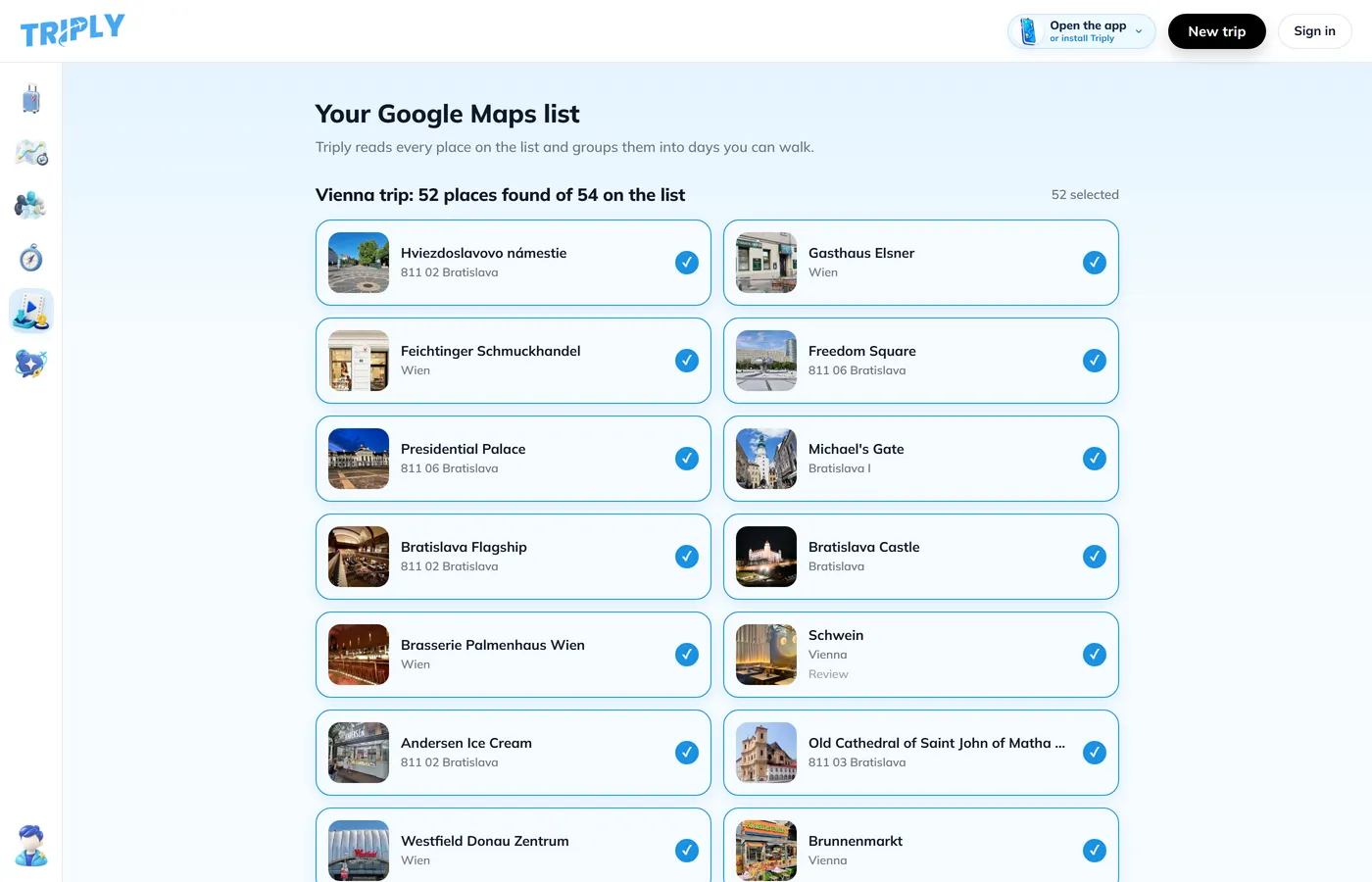
Paste the same share link into the Google Maps list to itinerary tool. It reads all 30 pins and the notes on them ("go early", "book"), matches each to a real place with a photo and coordinates, and shows you the list to untick. Drop the four you have outgrown. One tap later the 26 that are left are grouped into days by geography, each with a walking order, on a map.
Expect the draft to need ten minutes of editing. The beach day will be right. The tile museum may land on the same day as the viewpoints, which is a long walk, so you drag it. And a pin the list only calls "the rooftop near the elevator" cannot be verified; Triply names it as not found rather than guessing, and you add it by hand. That is the trade: no invented places, but the occasional one you resolve yourself.
Limits worth stating. Triply plans; for turn-by-turn navigation it opens Google Maps. The chat side (Triply AI, which can reshuffle the trip and answer "what fits on Saturday, walking only?") is part of Pro, with a 7-day trial. And a list that has never been shared has no link to read, so you share it first.
Use it for: going from a list (or a pile of TikToks and Reels) to a plan you will follow. Don't expect: it to replace Google Maps for directions, or to decide for you what the trip is about.
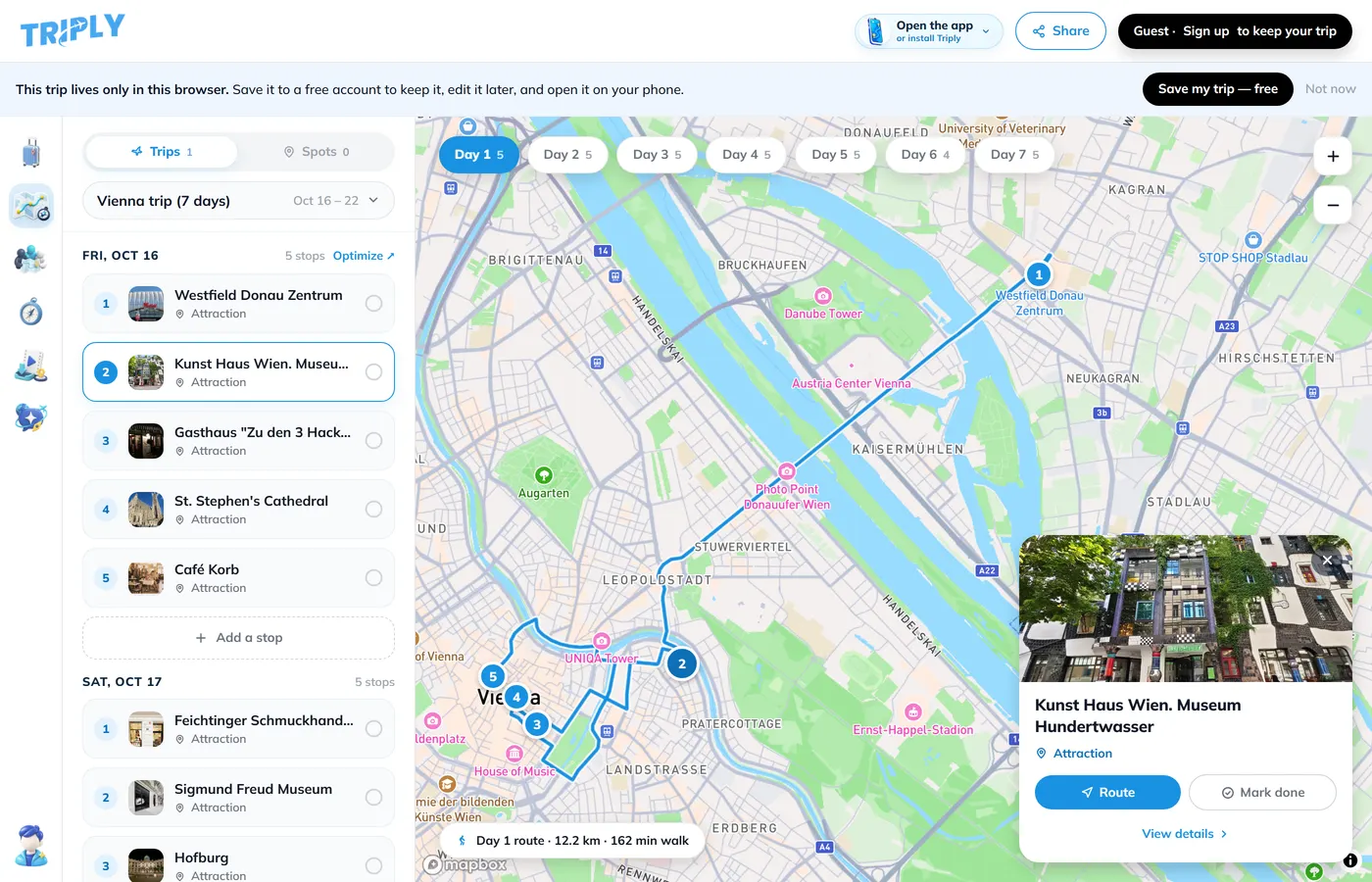
The workflow that uses all three
- Collect in Google Maps. Save into a list named after the trip, write a note on each save, and share the list so friends can add. Our guide to turning Google Maps saved places into an itinerary covers the collecting habits.
- Ask ChatGPT the soft questions. Which neighborhood to stay in, whether three days is enough, what to skip in August.
- Build the plan in Triply. Paste the list link, untick, build, then drag until each day has one anchor and five to seven places.
- Navigate with Google Maps on the day, from the trip in your pocket.
If you want the places out of Google Maps as a file first, for a spreadsheet or a backup, the export guide walks through Google Takeout. For planning, you do not need it; the share link is enough.
Frequently asked questions
Can ChatGPT read my Google Maps list?
Not reliably. A Google Maps share link is a short redirect that ChatGPT often cannot open, and the list itself loads in a web app that it cannot read. What works is pasting the place names as text, which means typing or exporting them first.
Can Google Maps make a day-by-day itinerary from saved places?
No. Google Maps saves and organizes places into lists and navigates between them, but it has no trip dates, no day-by-day scheduling and no route ordering across days.
Does Triply read a Google Maps list link?
Yes. Paste the share link of a saved list and Triply reads every place and note, matches each to a real location with a photo and coordinates, and groups them into walkable days. The first list is free in your browser with no account.
Is ChatGPT good for trip planning at all?
It is good at ideas, phrasing and answering questions about a place. Its weakness is facts: it can suggest places that have closed or never existed, and it has no map. Use it for inspiration, then verify the places in a tool that checks them.
Which tool should I use if my places come from TikTok and Instagram?
Triply. Paste the video or post link and every place in it is found and verified. Google Maps has no import from social apps, and ChatGPT cannot watch a video.